
Benefit types
If you are ready to start your video assessment select the join now button for the relevant benefit or if you want some more information on how to join, scroll down the page.
To start your video assessment click on the benefit type and follow the steps.
Testing your equipment for video assessments
Step 1
Please note: the screenshots on this page show examples of the screens you may see when joining your assessment. The screens displayed may vary depending on the benefit you are applying for.
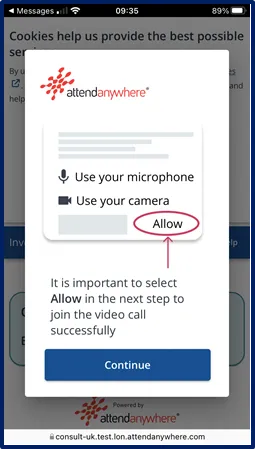
After clicking the appropriate 'Join now' link, you may see the 'Attend Anywhere' pop-up window. Please read the information and select 'Continue'. When prompted, select 'Allow' to give permission to use your camera and microphone.
Step 2
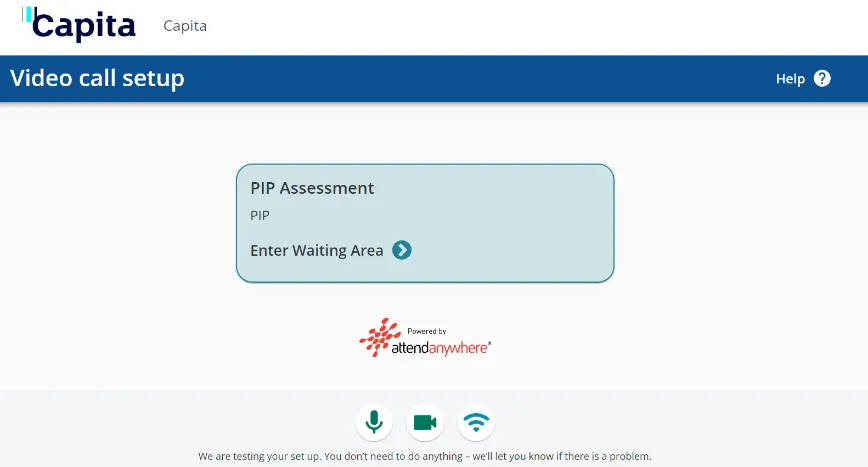
The 'Video call setup' screen will open. Select ‘Enter Waiting Area’.
Step 3
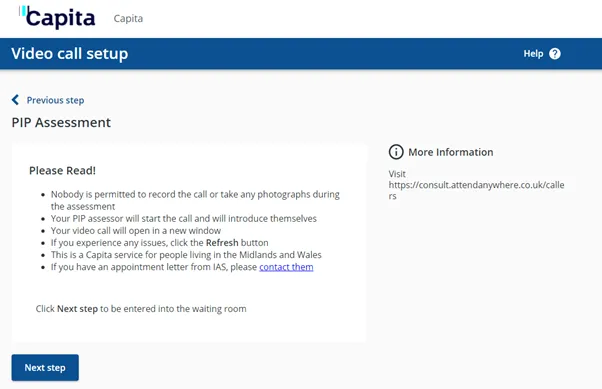
Once you enter the waiting area, information titled 'Please Read' will be displayed. Please read the information and then select 'Next Step' to continue.
Step 4
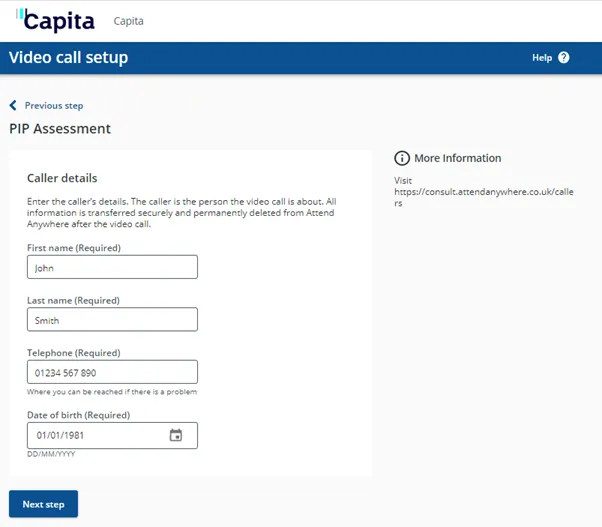
Enter your name, telephone number and date of birth. Select 'Next step'.
Step 5
Please read and accept the Terms and Policies by ticking the box. Then select 'Enter Waiting Area'.

Step 6
Step 7
The health professional will identify themselves by telling you their name and saying that they are from Capita.
They will then need to ask you some identification questions before your assessment can go ahead.